

Users
Users Management
This page allows administrators to manage users within the system. Administrators can view a list of all users and create new users using a modal form.
User List
A table that displays all registered users, including their name, email, and access level.
- ↳ Name: The full name of the user.
- ↳ Email: The user’s registered email address.
- ↳ Access Level: The permission level assigned to the user (e.g., "border," "dispatch," ).
- ↳ Actions: Options to edit, delete or block the user.
Create New User
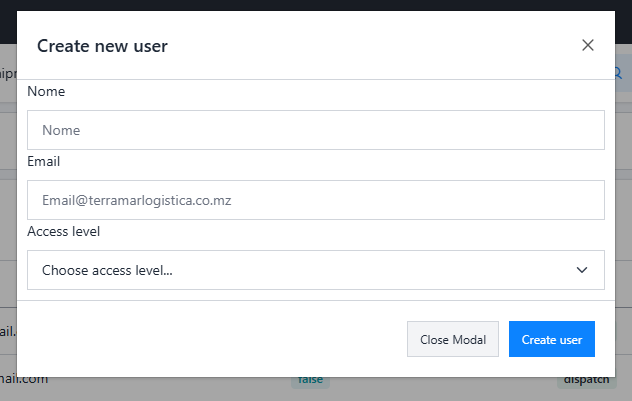
A button labeled "Create New User" is located above the user table. Clicking this button opens a modal form to add a new user.
- ↳ Name: Enter the full name of the user. (Required)
- ↳ Email: Enter the user’s email address. (Required, must be unique)
- ↳ Access Level: Select the user’s access level from a dropdown. The options in this dropdown are configured on the Permissions page.
Notes
- ↳ Permissions: Ensure the administrator has the appropriate permissions to access and manage the Users page.
- ↳ Error Handling: If a user cannot be created or updated due to validation errors, an error message will be displayed in the moda
Prev
Next