

Load
The Load Page displays all the load records in a table, providing users with detailed information about each load. The page allows users to manage these records, including the ability to edit load information. It also includes functionality for adding new loads using a modal form.
Create New Load
When the "Create New Load" button is clicked, a modal opens with the following fields:
- ↳ Customer: Select the customer associated with the load. (Required)
- ↳ Transporter: Choose the transporter responsible for the load. (Required)
- ↳ Load Name: Enter the name of the load. (Required)
- ↳ Switch (Receive Load | Send Load): Choose whether the load is received or sent. (Required)
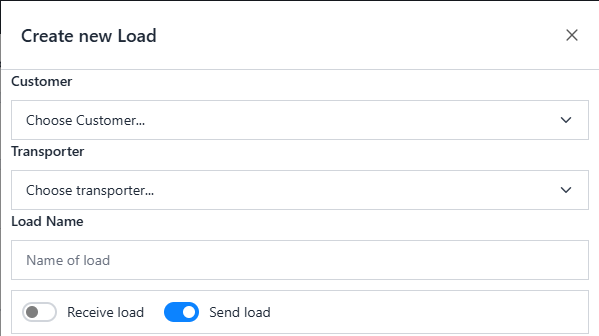
Dynamic Fields Based on Load Type
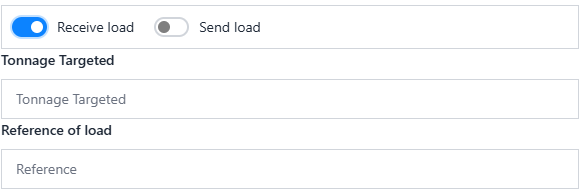
When the user selects Receive Load, the following additional fields appear:
- ↳ Tonnage Targeted: Specify the targeted tonnage for the load. (Required)
- ↳ Reference of Load: Enter the reference number for the load. (Required)
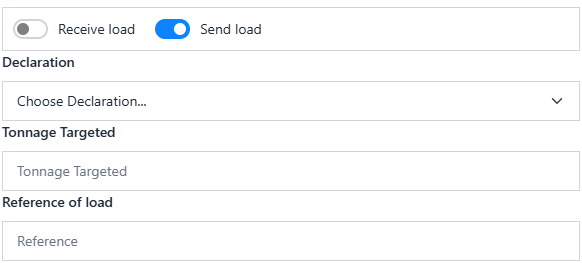
When the user selects Send Load, the following fields appear instead:
- ↳ Declarations: Specify any declarations related to the load. (Required)
- ↳ Tonnage Targeted: Specify the targeted tonnage for the load. (Required)
- ↳ Reference of Load: Enter the reference number for the load. (Required)
And other fields are the same:
- ↳ Documents: Upload any necessary documents related to the load. (Optional)
- ↳ Description: Provide a description of the load details. (Required)
After create a Load, the load is saved on database and displayed in table that contains the details of the load.

List Load
After create a Load, the load is saved on database and displayed in table that contains the details of the load.
Edit Load
To edit an existing load, the user clicks on the Edit Button (on Actions column) in the table. This will open the modal with pre-populated data, allowing the user to modify the load details. The same fields as above will be displayed for updating the load information.