

Permissios
Notification
The Notification Management page enables administrators to manage system notifications sent to users. Events can be configured to add or remove recipients, enable or disable notifications, and view the current recipients.
Table
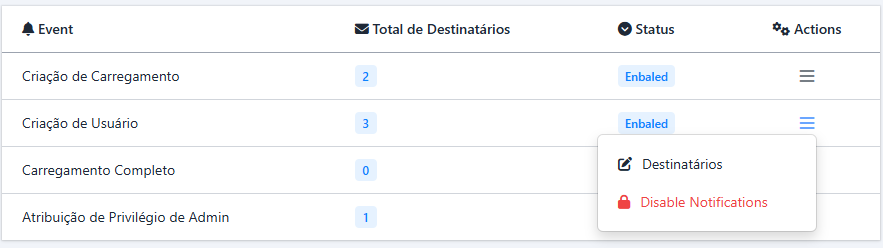
The main table displays the configured notifications with the following fields:
-
Events: Represents the system events, including:
- Load Creation: Triggered when a new load is created.
- User Creation: Triggered when a new user is created.
- Load Completion: Triggered when a load is marked as completed.
- Admin Privilege Assignment: Triggered when administrative privileges are assigned.
- Recipients: Total number of recipients configured for each event.
-
Status: Indicates whether the notification is active or inactive:
- Enabled: Notifications are currently active.
- Disabled: Notifications are currently inactive.
-
Actions: Includes the following options:
- Manage Recipients: Opens a modal to manage the recipients of the selected event.
- Disable Notification: Disables notifications for the selected event.
Manage Recipients (Destinatários)
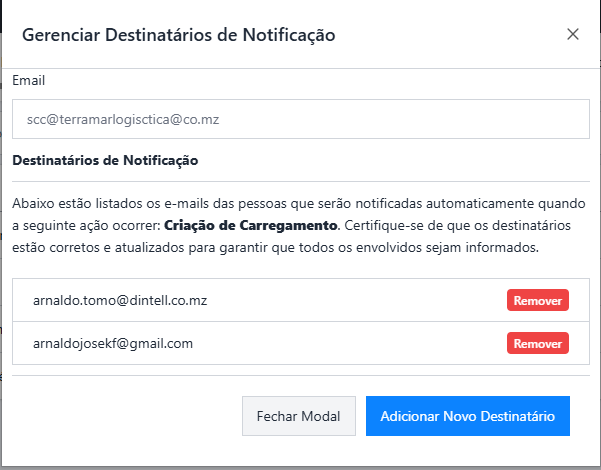
When click on the "Destinatários" on action column, a modal is shown. The modal allows administrators to manage recipients for a specific event.
-
Field: Email Input
- Allows adding a new recipient.
-
Validation Rules:
- The email must be unique for the event.
- The email must follow a standard email format.
-
Table: Current Recipients
- Displays the current recipients configured for the selected event.
-
Fields:
- Email: Email address of the recipient.
- Remove Button: Allows removing the recipient from the list.
Prev
Next